08_PASS BY REFERENCE VS PASS BY VALUE ( PRIMITIVE VS NON_PRIMITIVE / REFERENCE VALUE)
- JavaScript is dynamically typed language which means types are not defined at compile time like other object-oriented languages. JavaScript provides two categories under which the data types are divided.
- Primitive Values
- Reference Values
Primitive Values:
In JavaScript, a primitive is data that is not an object and has no methods. There are 7 primitive data types: string, number, boolean, null, undefined, symbol, biginit.
Most of the time, a primitive value is represented directly at the lowest level of the language implementation.
All primitives are immutable, i.e., they cannot be altered. It is important not to confuse a primitive itself with a variable assigned a primitive value. The variable may be reassigned a new value, but the existing value cannot be changed in the ways that objects, arrays, and functions can be altered.” - Source - MDN
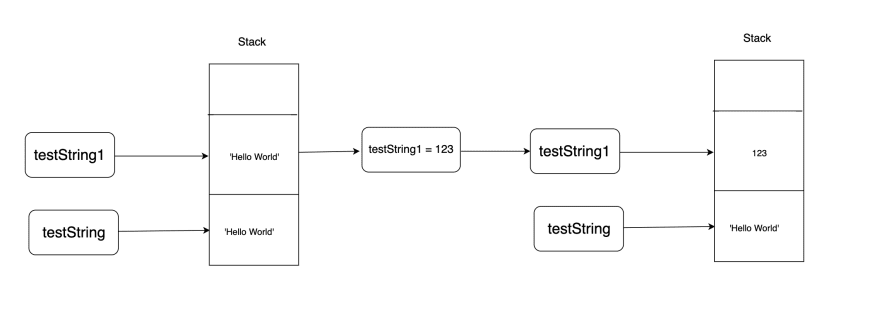
To break the above definition, it simply means that in case of primitive values, it creates and assigns a fixed location in memory for the defined variable. The primitive values are stored on Stack and the name itself is intuitive enough to understand that it is a stack of data, which has LIFO i.e. last in first operation.
     //Primitive Values..

      let testString = 'Hello World';
      let testString1 = testString;
      console.log('testString:', testString); // Hello World
      console.log('testNumber:', testString1 ); // Hello World

      testString1  = 123;

      Console.log('testString:', testString); // Hello World
       console.log('testNumber:', testString1 ); // 123
As we can see in the above code snippet, it copies and pastes and assigns a new location on stack.
Reference Values:
Reference values are objects stored in heap.Heapis a different kind of memory unlike Stack.Heap takes little longer to access and is able to hold bigger amount of data where data changes dynamically. The heap is the memory where the elements are not stored on top each other as it is done in stack but randomly, therefore each element has its own address. Reference values are primarily Objects and Arrays (Which are type of objects). To maintain Arrays and Objects in JavaScript we use both stack and heap together.
Below code snippet shows the object mutability.
Below code snippet shows the object mutability.
// Reference Values ..

   let testObject = {
    name : 'Chandler',
    age: 28,
    address: 'New York'
      }   ;

   let testObject1 = testObject;

   console.log('testObject:', testObject.name);    // Chandler
    console.log('testObject1:', testObject1.name);  // Chandler

    testObject1.name = 'Janice';

    console.log('testObject:', testObject.name);    // Janice
    console.log('testObject1:', testObject1.name); // Janice

Here, we see both objects contain same values associated with properties, this happens because objects are handled in a special way i.e. the memory block on stack holds memory address (pointer) of this object which is in turn stored in heap.

Note : As we have heard that everything is object in javascript but is it really true ?? or not.
if you want to be really correct then , string numbers and soon others are not Real Objects but are dynamically changed to pseudo Objects , you could say something like "name.length"
if you want to be really correct then , string numbers and soon others are not Real Objects but are dynamically changed to pseudo Objects , you could say something like "name.length"
- This gives you length of name with dot notation(.) , it kind of implies that we are accessing a property name which in turn implies that name would an object.
- "what happens there is it dynamically transform a string or number , so any primitive values to an object temporarily"
- Now, all real object are handled differently as they are most expensive to create like math object like random function
"they are more complex to manage and therefore creating them takes longer , occupies ore memory". Therefore browser typically stores them in heap , what browser does and important is variable stores the address of place in memory( only stores a pointer)."-
As we see in the above representation when an object is created by assignment, it does not allocate new memory block but creates a new pointer block and pushes onto the stack and both the pointers are pointing to the same place in the memory, resulting a change for variables pointing to elements place in memory.
Let’s see how arrays behave when altered.
      // lets us check what if we push on Array
  let testObject = {
    name : 'Chandler',
    age: 28,
    address: 'New York',
    friends: ['Monica', 'Ross', 'Joey']
};
   let testObject1 = testObject;


    testObject1.friends.push('Racheal');

     console.log('testObject:', testObject.friends);
    // ['Monica', 'Ross', 'Joey', 'Racheal']
     console.log('testObject1:', testObject1.friends);
   // ['Monica', 'Ross', 'Joey', 'Racheal']
Some usecases you must know as javascript developer:
- Lets talk about Usecase Where you have a person object and age :30 and Let us create new object person1 with same value in age property
Its seems like they are exactly same object (So let test it). I will do boolean comparision here:
person === person1 // false
person == person1 // false
- Well , now this makes a lot of sense , keep in mind that what we actually stored in person and person 1 is a pointer at a place in memory and these are totally two different objects.
"even though they hold same data but they are two different distinct object stored in two different places , so at different memory address ."
"this is why we got false result here because of Reference type thing and it is same for comparing Arrays"
Another implication is :
- Previously I created object with Let keyword ,Now here i will create object with Const keyword,
const hobbies = ['sports']
hobbies.push('cooking') // push or updates something to hobbies
"What do you except this works fine or not " ?
- "KEEP IN MIND" that This is a Const Keyword So, we can't change the value after it has been created . obviously you thought this will gives you a error.
IF we just get its output somewhere in console let say , We get no error but how it is possible
wait what,you kidding me?
- keep in mind that , this array gets created somewhere in memory and what getting stored in hobbies is that the address of the array or of that objects , the address is stored in the constant.
- Now , when we call push , we certainly do manipulate the data in memory but what we not manipulate is "The Address" : The data in memory gets changed but is still in the same memory .
But what if we do ??
hobbies = ['sports','movies'] // Type error , Assignment to Const Variable
"we got error here because we used equal sign here which creates a brand new address here"
We can achieve immutability in multiple ways
- ES5 Object.assign :
This method is used to copy the values of all enumerable own properties
from one or more source objects to a target object.
from one or more source objects to a target object.
    const testObject2 = Object.assign({}, testObject);
    testObject2.name = 'Paul';
    console.log(testObject.name); // Janice
    console.log(testObject2.name); // Paul
- ES5 Array slice():
The slice() method returns a shallow copy of a portion of an array into
a new array object selected from begin to end (end not included) where
begin and end represent the index of items in that array. The original
array will not be modified.
a new array object selected from begin to end (end not included) where
begin and end represent the index of items in that array. The original
array will not be modified.
  const testObject2 = Object.assign({}, testObject);
  testObject2.friends = testObject.friends.slice();
  testObject2.friends.push('George');
  console.log(testObject.friends);
  // [ 'Monica', 'Ross', 'Joey', 'Racheal' ]
  console.log(testObject2.friends);
  // [ 'Monica', 'Ross', 'Joey', 'Racheal', 'George' ]
- ES6 spreadOperator:
This method copies own enumerable properties from a provided object into
a new object.
a new object.
 // ES6 spread operator for Objects.
 let testObject = {
     name : 'Chandler',
     age: 28,
     address: 'New York'
 };
 const testObject2 = {...testObject};
 testObject2.name = 'Paul';
 console.log('testObject:', testObject.name);    // Janice
 console.log('testObject1:', testObject2.name); // Paul

 // ES6 operator for Arrays.
 const testObject2 = {...testObject};
 testObject2.friends = [...testObject.friends];
 testObject2.friends.push('George');
 console.log(testObject.friends);
 //[ 'Monica', 'Ross', 'Joey', 'Racheal' ]
 console.log(testObject2.friends);
 //[ 'Monica', 'Ross', 'Joey', 'Racheal', 'George']
Comments
Post a Comment