JavaScript : is a hosted language because browser provides platform to run. It provides J.S engine which at the end parses and understand all the J.S code and executes at the end.
Browser: actually exposes the functionality(Web API's) to let the JavaScript interact with the rendered code and in the end it is called Document Object Model. (Dom in the end is loaded or rendered html code or to be precise the Object Representational of this code which browser creates behind the Scence).
It allows a language (JavaScript) to manipulate, structure, and style your website. After the browser reads your HTML document, it creates a object representational tree called the Document Object Model and defines how that tree can be accessed.
What is the DOM?
At the most basic level, a website consists of an HTML document. The browser that you use to view the website is a program that interprets HTML and CSS and renders the style, content, and structure into the page that you see.
In addition to parsing the style and structure of the HTML and CSS, the browser creates a representation of the document known as the Document Object Model. This model allows JavaScript to access the text content and elements of the website document as objects.
"Almost any time a website performs an action, such as rotating between a slideshow of images, displaying an error when a user attempts to submit an incomplete form, or toggling a navigation menu, it is the result of JavaScript accessing and manipulating the DOM. In this article, we will learn what the DOM is, how to work with the document object, and the difference between HTML source code and the DOM.
Note: Although the DOM is language agnostic, or created to be independent from a particular programming language, throughout this resource we will focus on and refer to JavaScript’s implementation of the HTML DOM."
Note: Dom is not strictly tied to browser, there are other tools which can also parse html that's not even restricted to J.S
Advantages
By manipulating the DOM, you have infinite possibilities. You can create applications that update the data of the page without needing a refresh. Also, you can create applications that are customizable by the user and then change the layout of the page without a refresh. You can drag, move, and delete elements.
As I said, you have infinite possibilities — you just need to use your creativity.
Representation by the browser
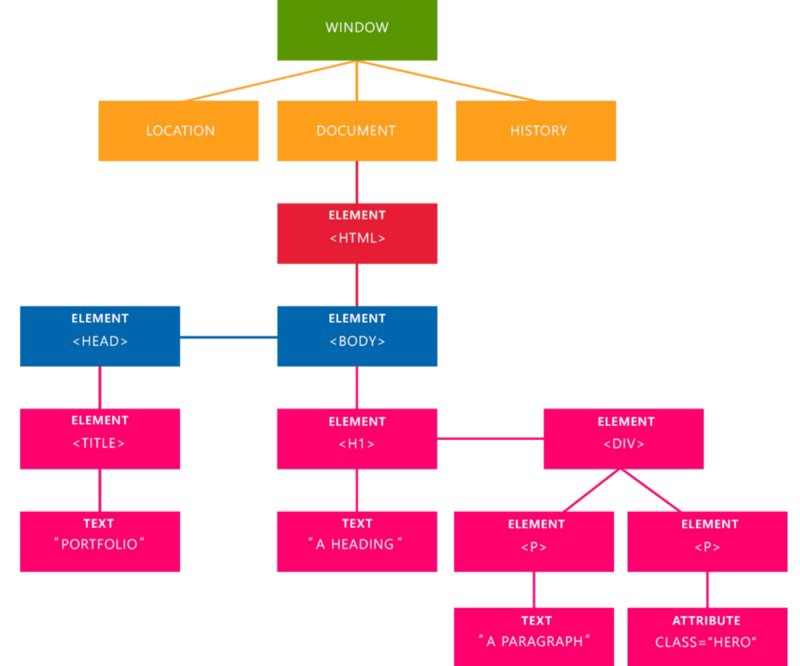
The representational tree that the browser create after it read your document.
In the image above, we can see the representational tree and how it is created by the browser. In this example, we have four important elements that you’re gonna see a lot:
Document: It treats all the HTML documents.
Elements: All the tags that are inside your HTML or XML turn into a DOM element.
Text: All the tags’ content.
Attributes: All the attributes from a specific HTML element. In the image, the attribute class=”hero” is an attribute from the <p> element.
Document :
The Document Object
: is the top most entry point to get acess through all the rendered Html page.(Root DOM node)
The document object is a built-in object that has many properties and methods that we can use to access and modify websites. In order to understand how to work with the DOM, you must understand how objects work in JavaScript.
In Developer Tools on index.html, move to the Console tab. Type document into the console and press ENTER. You will see that what is output is the same as what you see in the Elements tab.
document;
Output
#document
<!DOCTYPE html>
<htmllang="en">
<head>
<title>Learning the DOM</title>
</head>
<body>
<h1>Document Object Model</h1>
</body>
</html>
What is the Difference Between the DOM and HTML Source Code?
Currently, with this example, it seems that HTML source code and the DOM are the exact same thing. There are two instances in which the browser-generated DOM will be different than HTML source code:
The DOM is modified by client-side JavaScript
The browser automatically fixes errors in the source code
Let’s demonstrate how the DOM can be modified by client-side JavaScript. Type the following into the console:
document.body;
The console will respond with this output:
Output
<body>
<h1>Document Object Model</h1>
</body>
document is an object, body is a property of that object that we have accessed with dot notation. Submitting document.body to the console outputs the body element and everything inside of it.
In the console, we can change some of the live properties of the body object on this website. We’ll edit the style attribute, changing the background color to fuchsia. Type this into the console:
document.body.style.backgroundColor = 'fuchsia';
After typing and submitting the above code, you’ll see the live update to the site, as the background color changes.
Switching to the Elements tab, or typing document.body into the console again, you will see that the DOM has changed.
Output
<bodystyle="background-color:fuchsia;">
<h1>Document Object Model</h1>
</body>
Note: In order to change the background-color CSS property, we had to type backgroundColor in the JavaScript. Any hyphenated CSS property will be written in camelCase in JavaScript.
The JavaScript code we typed, assigning fuchsia to the background color of the body, is now a part of the DOM.
However, right click on the page and select “View Page Source”. You will notice that the source of the website does not contain the new style attribute we added via JavaScript. The source of a website will not change and will never be affected by client-side JavaScript. If you refresh the page, the new code we added in the console will disappear.
"The other instance in which the DOM might have a different output than HTML source code is when there are errors in the source code. One common example of this is the table tag — a tbody tag is required inside a table, but developers often fail to include it in their HTML. The browser will automatically correct the error and add the tbody, modifying the DOM. The DOM will also fix tags that have not been closed.
"Window: is a global object which has document as property window is the real top most global object mode available to you in J.S in the browser (Global entry point means it gives you access to all the features to that browser that you want to expose in)
Try this out in browser console:
document // gives access to the document object
console.dir(document) // this will gives access to entire object which reflects your document body and every things attached and also allows to access the Html content rendered in there and soon
window // real top most that gives you access to all the core Api's that browser wants to expose you.
ex: alert() // function that throws you alert
Note : "By default, In your J.S code if you are running and typing then you will have an access to everything in window
that why you can type alert() just like that."
Total correct would be window.alert() because window is the top most object which is exposed to you by the browser.
" browser always looks window object if you are accessing something"
when you write,document the browser will automatically looks at the window object :
JavaScript is an interactive language, and it is easier to understand new concepts by doing. Let’s create a very basic website. Create an index.html file and save it in a new project directory.
index.html
<!DOCTYPE html>
<htmllang="en">
<head>
<title>Learning the DOM</title>
</head>
<body>
<h1>Document Object Model</h1>
</body>
</html>
This code is the familiar HTML source of a new website skeleton. It contains the absolute most essential aspects of a website document — a doctype, and an html tag with the head and body nested inside.
For our purposes, we’ll be using the Chrome browser, but you can receive similar output from other modern browser. Within Chrome, open up index.html. You’ll see a plain website with our heading saying “Document Object Model”. Right click anywhere on the page and select “Inspect”. This will open up Developer Tools.
Under the Elements tab, you’ll see the DOM.
In this case, when expanded, it looks exactly the same as the HTML source code we just wrote — a doctype, and the few other HTML tags that we added. Hovering over each element will highlight the respective element in the rendered website. Little arrows to the left of the HTML elements allow you to toggle the view of nested elements.
The Problem JavaScript has two visually similar, yet very different , ways to test equality. You can test equality with == or === . Here are the differences: Triple Equals When using triple equals === in JavaScript, we are testing for strict equality. This means both the type and the value we are comparing have to be the same. Lets look at a couple examples of strict equality. In this first example we’re comparing the number 5 with the number 5. As expected, true is returned. Both are numbers , and both share the same value of 5. 5 === 5 // true With this in mind, we can look at two more examples that will return true : 'hello world' === 'hello world' // true (Both Strings , equal values ) true === true // true (Both Booleans , equal values ) Awesome. Now lets take a look at some examples that will return false : In this example we’ll comp...
Let look inside js engine the things that execute our code and in the end ,it is all about our memory management and execution steps. For this we have two important concept: The heap memory is our long term memory , it is all about memory allocation , stores data in your system and manages access to it. " i mean browser does that , browser manages heap things, browser taps into our system memory and of course OS , it allocates memory to the browser app. There the data gets stored which we work in our program and most importantly long term data. There is then Stack thing , is end important for execution of code. Stack is kind of short term memory means Stack control over which function is currently executing. " Heap memory is used by all the parts of the application whereas stack memory is used only by one thread of execution. Whenever an object is created, it's always stored in...
createElement() : creating a new array and appending to end of node <! DOCTYPE html> < html lang = "en" > < head > < meta charset = "UTF-8" > < meta name = "viewport" content = "width=device-width, initial-scale=1.0" > < meta http-equiv = "X-UA-Compatible" content = "ie=edge" > < title > Arrays & Iterables </ title > < script src = "app.js" defer></ script > </ head > < body > < ul > < li > Item 1 </ li > < li > Item 2 </ li > < li > Item 4 </ li > < li > Item 3 </ li > </ ul > < script > const list = document . querySelector ( 'ul' ) const newLi = document . createElement ( 'li' ) // it just create a <Li> element // but still not attache...


Comments
Post a Comment